
Industry refers to the sector or domain in which a job, organisation, or role operates. It helps classify jobs based on the type of business or services provided by an organisation.
Why Industry Matters
Using Industry helps you to:
- Group jobs under relevant sectors
- Match candidates to the right domain
- Improve job and candidate search
- Analyse hiring trends by industry
- Maintain consistent data across the system
Industry Examples
Below are common industry types used in recruitment:
|
Industry |
Description |
Example Roles |
|
Healthcare |
Jobs related to medical services, hospitals, and healthcare organisations |
Nurse, Doctor, Pharmacist, Healthcare Assistant |
|
Hospitality |
Jobs related to hotels, restaurants, travel, and customer service |
Chef, Hotel Manager, Front Desk Executive |
|
Education |
Jobs related to schools, colleges, and training institutions |
Teacher, Lecturer, Academic Coordinator |
|
HR (Human Resources) |
Jobs related to people management, recruitment, and organisational development |
HR Executive, Recruiter, HR Manager |
Example Scenario
If you create a job for a Nurse, you can select Healthcare as the Industry.
If you create a job for a Hotel Manager, you can select Hospitality as the Industry. This helps the system understand the domain of the job and aligns candidates accordingly.
To navigate to the Industry Master, follow the steps below:
- Click on the Profile picture and select Administrator from the drop-down menu.
- Click on Master Data from the left navigation panel and select Industry under Job.
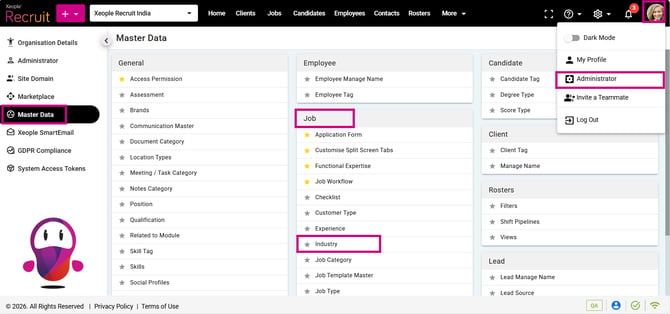
Profile Picture – Administrator – Master Data – Industry
- Click on the (+) add button on the top left.
- Enter the required fields and click Save.
Meaning
|
Field Name |
Purpose |
|
Display Sequence |
Order of industries in UI/dropdowns |
|
Code |
Unique short industry identifier |
|
Description |
Full industry name description |
|
External ID |
ID used for mapping with EOH system |
|
Score |
Priority or importance rating |
|
Status |
Active/Inactive |
|
Hide Externally |
Controls visibility outside the system |
|
Display Sequence |
Code |
Description |
Purpose |
External ID |
Score |
Status |
|
1 |
HCDPV |
Healthcare & Life Sciences |
Used to classify organisations providing medical, clinical, and health services. |
EXT-HCP-001 |
85 |
Active |
|
2 |
HOSPV |
Hospitality & Tourism |
Used to categorise businesses in hotels, travel, tourism, and customer service sectors. |
EXT-HOS-002 |
75 |
Active |
|
3 |
EDUPV |
Education & Training |
Used to identify institutions involved in education, training, and learning services. |
EXT-EDU-003 |
70 |
Active |
|
4 |
HRPVR |
Human Resources & Staffing |
Used to classify organisations providing HR services, recruitment, and workforce solutions. |
EXT-HR-004 |
65 |
Active |
- Click on the three-dot button placed in front of each Industry to edit or delete it.
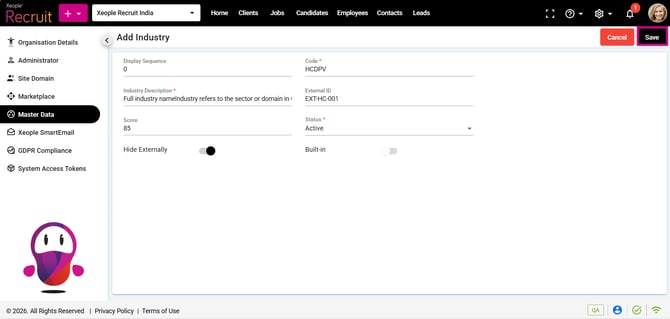
Industry – Save
- You can select the newly created Industry from the Industry drop-down when creating a job.
When you create a job, you define its qualifications/role and skills. The qualification/role can/cannot be mapped to any industry. The same qualifications/role and skills must be configured in the application form, because a single (default) application form can be mapped to multiple jobs.
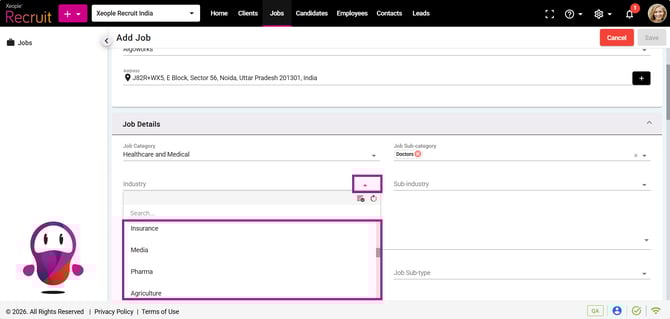
Add a Job – Industry
Industry and Qualification Logic – Application form – Candidate Apply:
-
If Industry is mapped to both Job and Client → Shows Job-specific qualifications/roles + Global qualifications.
-
If Industry is mapped to Client but NOT Job → Shows Client (Industry) specific + Global qualifications.
-
If Industry is mapped to job→ Job-specific qualifications/roles + Global qualifications.
-
If Industry is set as default from the industry master (under primary column) → Industry selected qualifications/roles + Global qualifications.
-
If no Industry mapping exists → Shows all active Global qualifications (not tied to any industry).
-
Priority Order: Job > Client >Industry Master> Global Qualification.
A Qualification / Role can be linked to one or multiple Industries, and an Industry can also be linked to multiple Qualifications / Roles. Qualification / Role remains the unique identifier, but it is not unique per Industry.
Recommend Reading: How Qualification/Role master configured, click here: Master Data - Qualifications / Roles.
Recommend Reading: How the Qualification/Role field values populate when candidates apply via application form, click here: Share Job Apply Page, Job Posting - Link Out.
Recommend Reading: How the XR Industry and Qualification/Role are mapped with the EOH Industry and Qualification/Role, click here: Job Action (Split Screen), Push Candidate as an Applicant - Candidate Landing & Summary.
FAQs
1. What is the purpose of Industry Master?
Industry Master is used to maintain and manage industry records that can be mapped with jobs, clients and qualifications/roles.
2. What is the purpose of the Code field?
The Code field stores a unique short identifier for each industry.
3. What is the purpose of External ID?
External ID is used for integration or mapping with the EOH system.
4. What happens when an industry is marked Inactive?
Inactive industries are hidden from active selection and system processes.
5. Can one industry have multiple qualifications/roles linked to it?
Yes. One industry can be linked to multiple qualifications/roles.