
This release, we have enhanced the Contacts module by introducing Tags as a filter and customisable column on the Contact Landing Page, along with Tags in the Contact Summary for improved visibility and management. We have also resolved issues affecting candidate address and proximity calculations, note loading, Job Workflow substage updates and Client Type field synchronisation.
Enhancement
1. Contact Summary - Added Tags
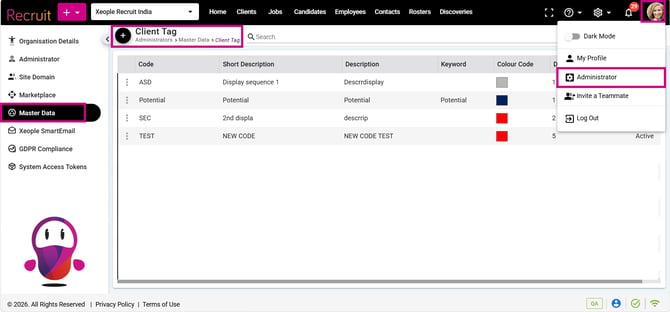
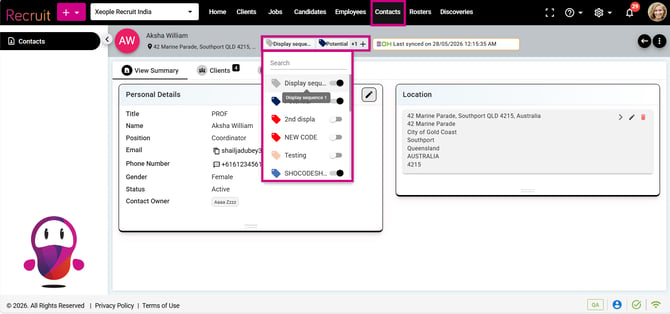
Enhanced the Contact Summary by introducing Tags in the page header. Users can view and manage multiple tags mapped to a contact using tags configured under Client Tag > Master Data. The Tag pop-up displays each available tag with its Short Code, configured colour, and full tag name, allowing users to select or deselect multiple tags using the toggle control. Existing mapped tags are displayed as selected. Up to two mapped tags are displayed in the page header, with additional tags accessible through the + icon. All tag mapping changes are saved against the contact, with an Audit Log maintained for tag additions, updates, and deletions.
2. Contacts Landing - Three -dot - Filters and Customised Column
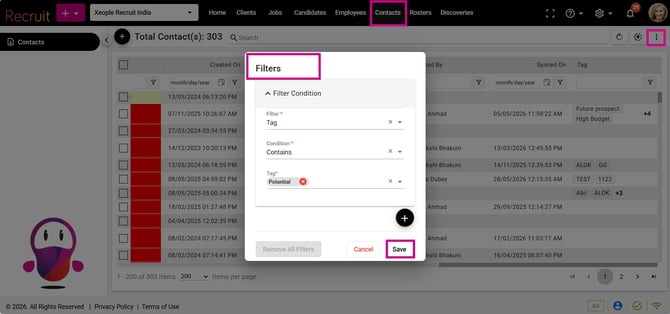
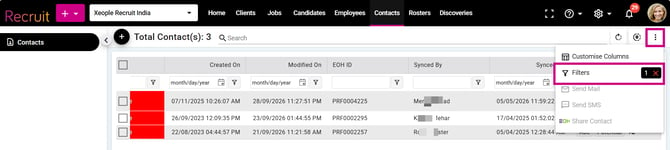
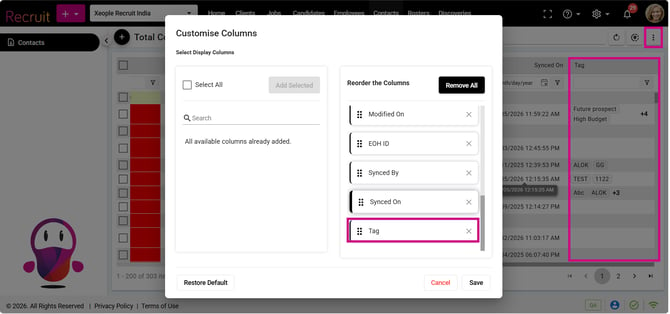
Enhanced the Contact Landing Page by introducing Tags as a filter and a customisable column in the Contact List view. This enhancement improves contact search and visibility by allowing users to quickly identify and filter contacts based on their assigned tags without opening individual contact records. The Tag field is available as a default column in the Contact List view with the standard Kendo filter option and is also available under Customise Columns, allowing users to add or remove it based on their preferences. The Tag filter is displayed as a drop-down and is dynamically populated with values configured under Client Tag > Master Data, with support for Contains and Does Not Contain filter conditions. When a filter is applied, the selected filter is displayed on the landing page along with a Reset/Clear (×) option.