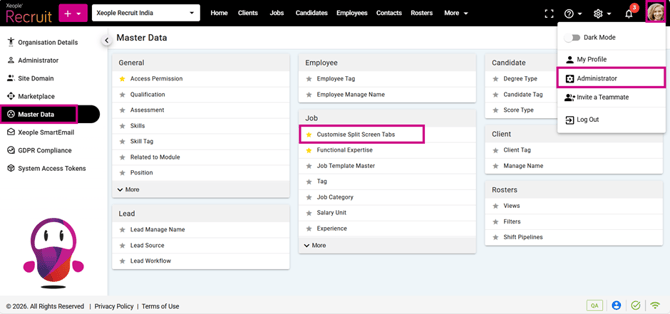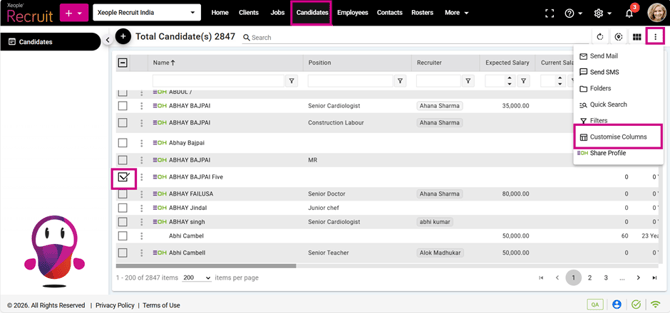
This release focuses on improving email handling and overall application clarity. Bulk emails are now sent only to the recipients currently visible in the “To” field after any additions or removals, ensuring accurate delivery. In addition, UI labels have been standardised and unused tabs removed to enhance clarity and maintain consistent navigation across modules. Additionally, two internal bugs have been resolved during this sprint, ensuring a smoother and more reliable user experience.
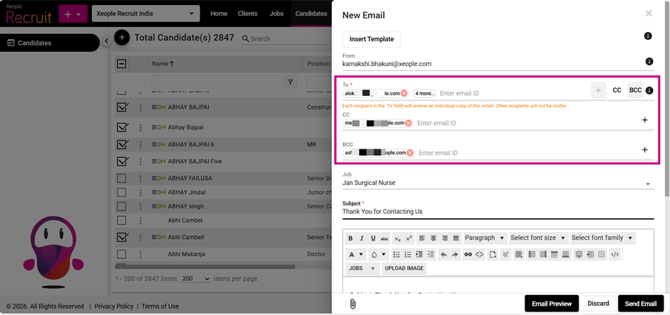
When you bulk‑select recipients, their email addresses appear in the To field. If you add or remove anyone, the system sends emails only to the recipients currently visible in the To field.
If you add a new internal candidate, placeholders (if used) will populate correctly. If you add an external email, they will receive exactly what is written in the editor.
CC and BCC recipients receive one separate email for each person in the To field, and BCC names are hidden from everyone.
For example: If John and Elsa are in the “To” field, Michael and Sophia in CC, and David and Emma in BCC, then John and Elsa each receive one email, while Michael, Sophia, David, and Emma each receive two separate emails and BCC recipients remain hidden from everyone.
2. Across Application – Updated Labels & Removed Non-functional Fields
We renamed Support to Help Support, removed the Roadmap tab, renamed Job Automation to Customise Split Screen Tabs, removed all non‑operational tabs (Progress Reminder under Job Auto), and changed Action button to Customise Columns.