
The Site Domain defines the URL through which the system is configured and accessed. It serves as the primary address for users to log in and use the application.
At the time of tenant creation, the configured site URL becomes the default domain for the system. This domain can be updated later from the Site Domain settings by the Super Admin.
Once updated, the new domain takes effect immediately, and all login requests from the old URL are automatically redirected to the new one.
To ensure a smooth transition, it is recommended to inform all users to start using the new site URL and to update any previously saved or shared links.
Purpose
The Site Domain is used to define and manage domain names associated with the system. It supports system access, integrations, and communication while ensuring secure and consistent domain configuration across environments.
Benefits
- Centralised management of domain configurations
- Secure and controlled system access
- Support for multiple environments (e.g., production, staging)
- Consistent domain usage across the platform
To configure the Site Domain, follow the steps below:
- Click on the Profile picture and select Administrator from the drop-down menu.
- Click on Master Data from the left navigation panel.
- Select Site Domain under the System or General section.
- Enter the Site Domain Name and click Save.
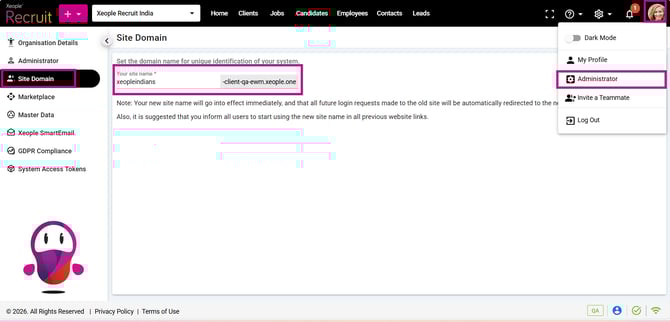
Profile Picture – Administrator – Site Domain