
Xeople integrates with Kudosity to enable seamless SMS communication for recruitment workflows such as notifications, alerts, and candidate engagement.
With this integration, SMS messages are sent via Kudosity’s infrastructure, ensuring reliable delivery and scalability.
Recommend Reading: Purpose of Marketplace, click here: Marketplace Configuration - Purpose.
Integration Overview:
- Xeople-Managed Integration: In this setup, Xeople handles the complete configuration during onboarding based on your requirements. This includes:
- Creating and configuring the Kudosity account on your behalf.
- Generating and managing API credentials.
- Assigning a dedicated number (if applicable).
- Completing all technical configurations within Xeople.
- Purchasing and allocating SMS credits.
- SMS credits are the payment units that determine how many text messages you can send in XeopleRecruit. Each SMS (up to 160 characters) or multipart message uses one or more credits.
- You can manage your SMS credits in two ways:
- The XR team can purchase credits from Kudosity and allocate them to you or purchase them directly through your client account.
- You’ll see your SMS Credit Balance at the top of the SMS section.
If you were unsure about opting for the SMS service at the time of onboarding but would like to enable it now, please raise a ticket on the Xeople Support Portal. Our team will assist you with integrating Kudosity.
Navigation:
To enable Kudosity:
- Navigate to the marketplace, locate Kudosity, and click Enable.
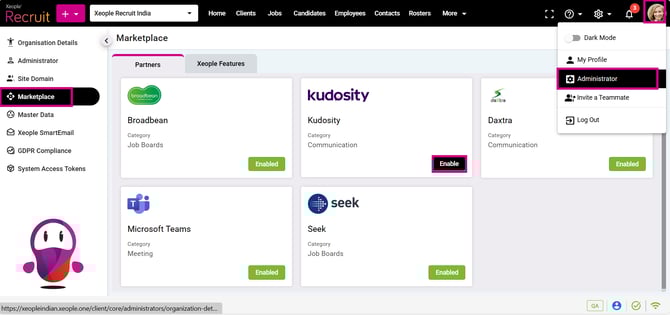
Administrator – Marketplace – Kudosity – Enable
- Click Get Started.
-
- API URL: This is the endpoint provided by Kudosity for sending SMS requests. It enables communication between Xeople and the SMS service provider.
- API Key: A unique authentication key provided by Kudosity. Required to authorise SMS requests from Xeople. Must be kept secure and not shared publicly.
- Dedicated Number: This is the sender number from which SMS messages will be sent. There are two possible scenarios:
- Dedicated Number (Configured)
- Specific number assigned by Kudosity. All SMS messages are sent from this single, consistent number. A dedicated number is required to support two‑way SMS communication directly from the application.
- Non-Dedicated Number (Not Configured)
- If no dedicated number is provided, Kudosity dynamically assigns a sender number. Messages may be sent from different numbers each time. If no dedicated number is provided, Kudosity dynamically assigns a sender number, enabling one‑way SMS communication only. Messages may be sent from different numbers each time, and recipients cannot reply.
- Dedicated Number (Configured)
These fields are pre-filled and managed by Xeople. Changes should only be made if advised by the XR team.
- Save.
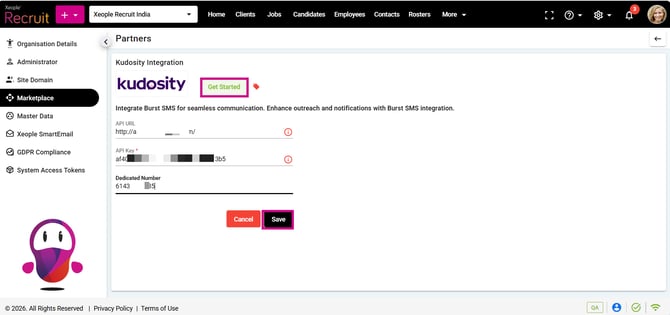
Kudosity – Enter Information – Save
- Once enabled, Kudosity integration is active. SMS functionality is ready to use
- Similarly, to disconnect, click on the Disconnect.
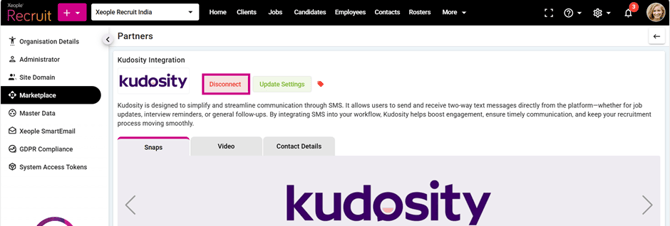
Kudosity – Disconnect
Important Notes
- Xeople is integrated with the SMS service provider (Kudosity).
- SMS messages are sent through the provider’s infrastructure.
- Messages are not sent from the mobile numbers stored in user profiles. The sender number is always determined by the Kudosity configuration (dedicated or dynamic).