
The Communication Master is used to define and manage different communication categories and contact types in the system. It helps standardise how communication details such as email, phone, SMS, and chat are classified and used across modules.
The Communication Master helps to:
- Standardise communication channels (Email, Phone, SMS, etc.)
- Define contact labels (Main, Office, Alternate, etc.)
- Ensure consistent classification of contact details across the system.
- Improve data accuracy and usability.
- Enable better communication tracking and reporting.
To navigate to the Communication Master, follow the steps below:
- Click on the Profile picture and select Administrator from the drop-down menu.
- Click on Master Data from the left navigation panel and select Communication Master under General.
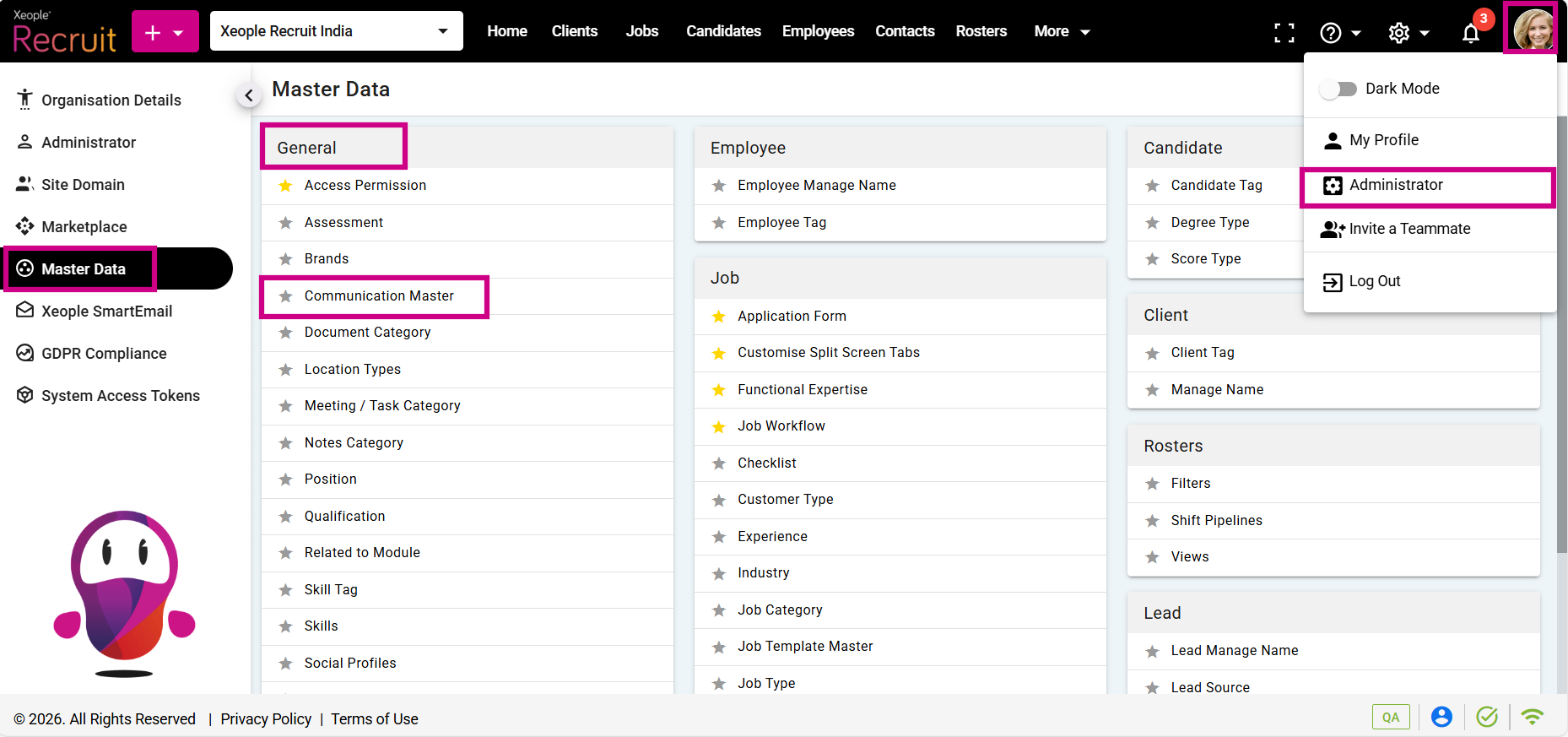
Profile Picture – Administrator – Master Data – Communication Master
- Click on the (+) add button on the top left.
- Enter the required fields and click Save.
Category Type
Category Type defines the mode of communication and is system defined.
|
Category Type |
Description |
|
|
Email communication |
|
Phone |
Voice call communication |
|
SMS |
Text messaging |
|
Chat |
Chat-based communication |
|
Google Meet |
Online meeting |
|
Zoom Meeting |
Video conferencing |
|
Push Notification |
System notifications |
|
Webinar |
Online event communication |
Contact Type
Contact Type defines the label or purpose of the contact detail within a category.
|
Contact Type |
Example Usage |
|
Main (System Configured) |
Primary email or phone number |
|
Office |
Official office contact |
|
Alternate |
Secondary contact number/email |
|
Personal |
Personal contact detail |
|
First Office |
Primary office location contact |
|
Support |
Support contact |
|
Emergency |
Emergency contact |
Example Mapping
|
Category Type |
Contact Type |
Example |
|
|
Main |
main@company.com |
|
|
Office |
hr@company.com |
|
Phone |
Main |
+91 98765 43210 |
|
Phone |
Alternate |
+91 91234 56789 |
|
Chat |
Main |
Teams / Slack ID |
|
Zoom Meeting |
Office |
Company Zoom link |
The Main contact type is system‑configured and cannot be edited or deleted.
- Once saved, the configured types are displayed under their respective fields, as shown in the below example.
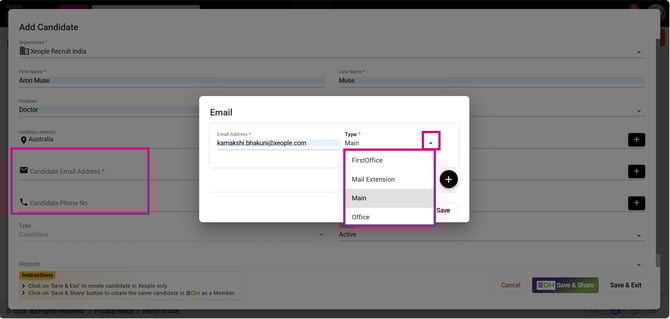
Add Candidate – Email – Type