
Candidate Skill Master consolidates and arranges data pertaining to candidates’ skills. By configuring this, you can efficiently match candidate skills with job requirements, streamlining the hiring process.
To configure Candidate Skill Master, proceed by following the steps outlined below:
- Click on the Profile picture and select Administrator from the drop-down menu.
- Click on Master Data from the left navigation panel.
- Under the General Master Data, select Skills.
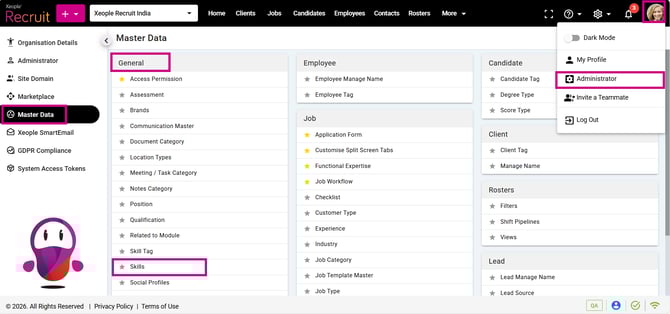
Administrator - Master Data - Skills
Certain values in the Masters are predefined by the system and cannot be edited by the Super Admin.
- Click the (+) button to add new skills.
- Enter the Skill Name and details, then click Save.
The skills you add from here will be visible while creating a job. Additionally, you have the option to manually select candidate skills (which are defined here) from the candidate summary page and assign the candidate to the relevant job as needed.
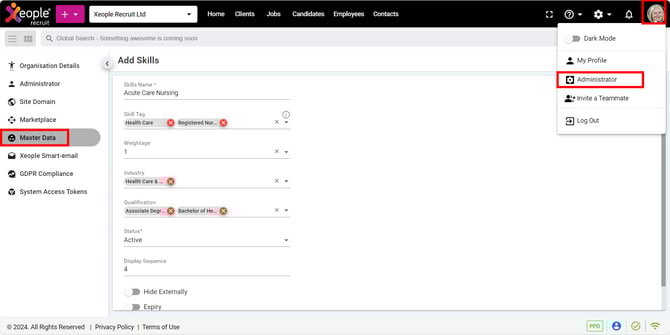
Administrator – Master Data – Add Skills – Save
- If you wish to modify or remove the added skill, click the three-dot button and select Edit or Delete from the drop-down menu, as required.
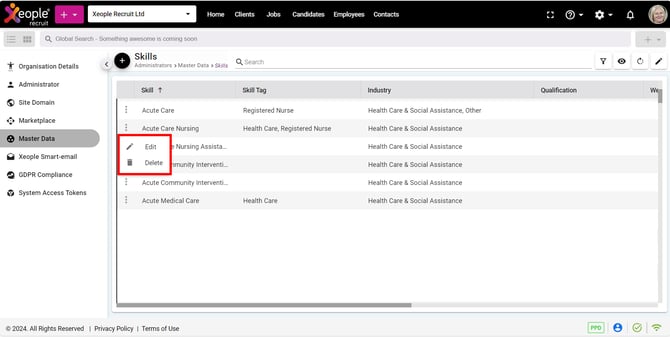
Master Data – Skills – Edit or Delete
The XR Skills Master is automatically updated when candidates transfer their profile from SEEK during applications.
What happens:
-
Candidate skills from SEEK profiles are imported via the API
-
Any skills not already in the system are added to the Skills Master
-
This occurs automatically — not from internal users
Important to know:
-
Skills may include duplicates, variations, or spelling errors
-
These come directly from candidate-entered data
-
This is intended system behaviour, not a bug
Admins can still review, merge, or standardise skills internally if needed.