
The Brand Master is used to create and manage brands within the system. It enables organisations to standardise brand information and use it consistently across the job module.
Benefits
- Centralised management of brand information
- Consistent brand usage across the job module
- Improved data organisation and standardisation
- Enhanced filtering and reporting capabilities
Example
|
Brand Name |
Status |
|
ABC Technologies |
Active |
|
XYZ Solutions |
Active |
To navigate to the Brand Master, follow the steps below:
- Click on the Profile picture and select Administrator from the drop-down menu.
- Click on Master Data from the left navigation panel and select Brands under General.
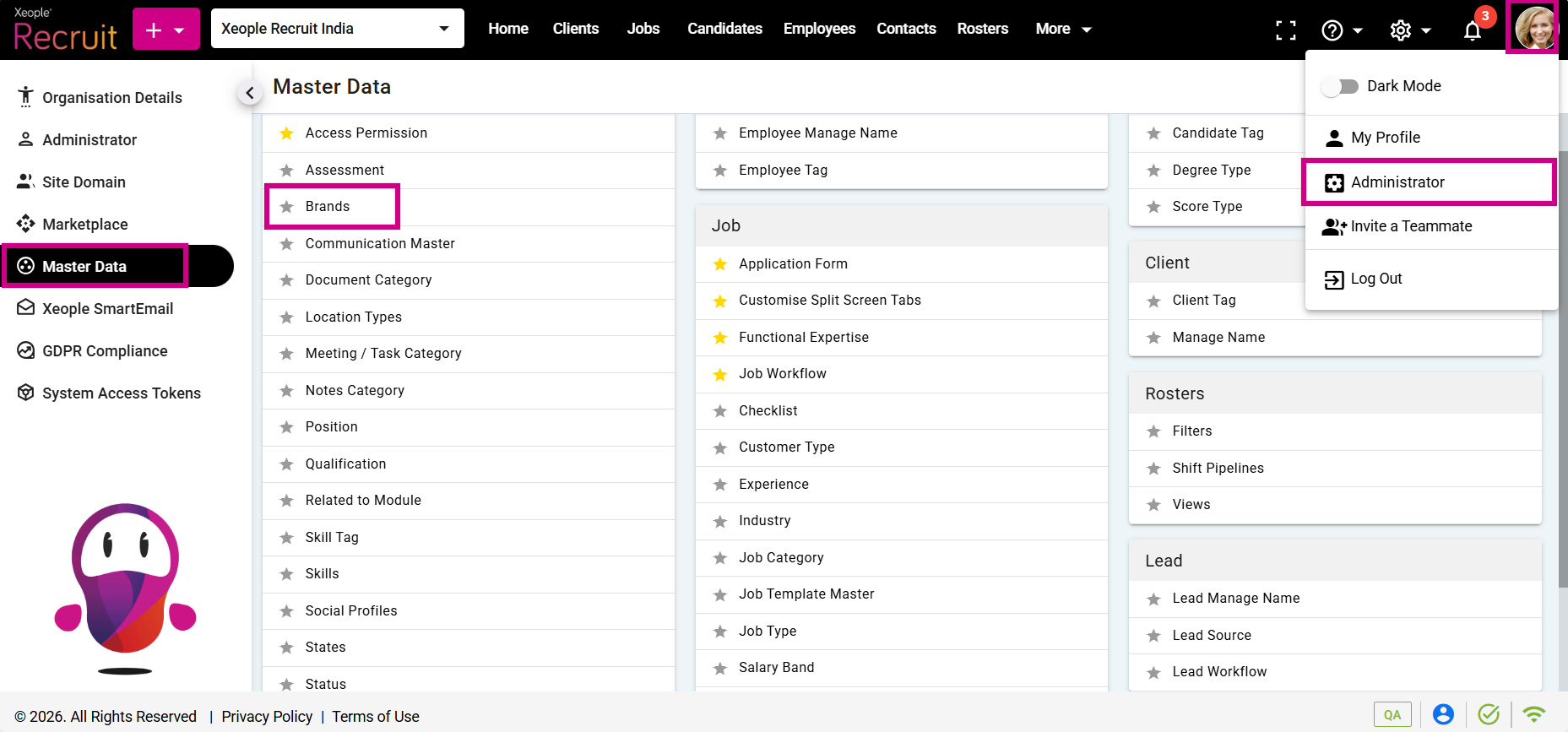
Profile Picture – Administrator – Master Data – Brands
- Click on the (+) add button on the top left.
- Enter the required fields and click Save.
- Click on the three-dot button placed in front of each brand to edit or delete it.

Add Brand – Save
- You can select the newly created Brand from the Brands drop-down when creating a job.

Add a Job – Brand