
System Settings refer to the configurable parameters or options within the XeopleRecruit application. These settings allow users to adjust and personalise the behavior and appearance of the application according to their specific needs and preferences.
To configure your application/system settings, proceed by following the steps outlined below:
- On the main navigation header, click on the Settings drop-down and select System Setting.
- This allows you to configure the applications details as per your specific needs.
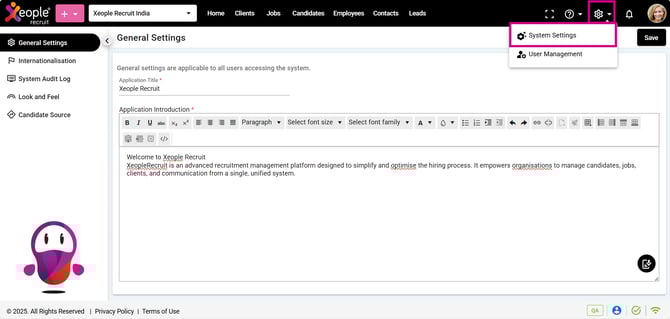
System Settings
System settings consist of following features to configure, check out the list below:
- General Settings: Set and customise both the application title and introduction.
- Internationalisation: Personalise the experience by customising the default language, country, currency, region, and time zone within the system.
- System Audit Log: Review a comprehensive, time-stamped log of all actions, changes, and access to critical resources within the system.
- Look and Feel: Personalise the system’s look and feel by configuring elements such as logos, favicons, navigation colors, date/time formats, and proximity settings.
- Candidate Source: Candidate/application source refers to the origin where candidate applications are received, such as Application Forms, Broadbean, SEEK, EOH, Xeople SmartEmail, etc. This feature allows you to add, edit, or delete custom sources based on your needs.