
Application Status Master helps track an applicant’s progress throughout the recruitment lifecycle. It defines and manages application statuses (mapped to a stage type) such as applied, screening, interview, offered, onboarding, hired, rejected, or on hold. This enables recruiters and administrators to monitor each applicant’s current stage, streamline recruitment activities, and maintain clear visibility into the hiring process from application submission to closure.
Each Job Workflow Stage must be mapped to a Stage Type, which is mandatory. Only one stage type can be assigned to a workflow stage, and it cannot be reused across stages.
Stage Types categorise the phases of the recruitment workflow. If a required stage type is unavailable, use Others, which can be mapped to multiple workflow stages. All other stage types can be mapped only once. The system validates these mappings and enables or disables Save accordingly.
Optional Reading: How to configure a Job Workflow, click here: Master - Job Workflow.
To view the Application Status Master (Stage Type), proceed by following the steps outlined below:
Stage types are system-defined by Xeople to ensure workflow consistency and cannot be user-defined.
- Click on the Profile picture and select Administrator from the drop-down menu.
- Click on Master Data from the left navigation panel.
- Under the General Master Data, select Status.
- Now, you will see Groups, click on Application three-dot button and select View from the drop-down.
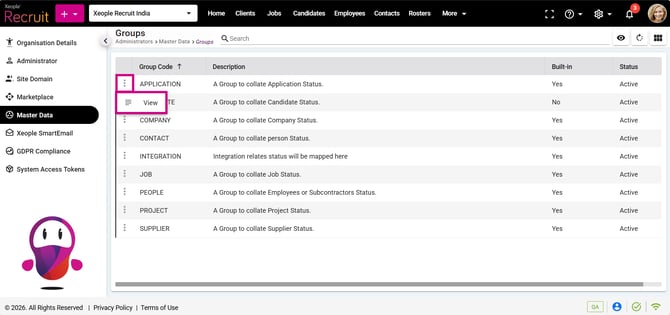
Administrator – Master Data – Status – Groups – Application
- You can see all the workflow stage types mapped to each status defined in the system.

Application – Status
- The applicant status you see here will appear while creating job workflow. This application status shows all the stage type mapped to a status.
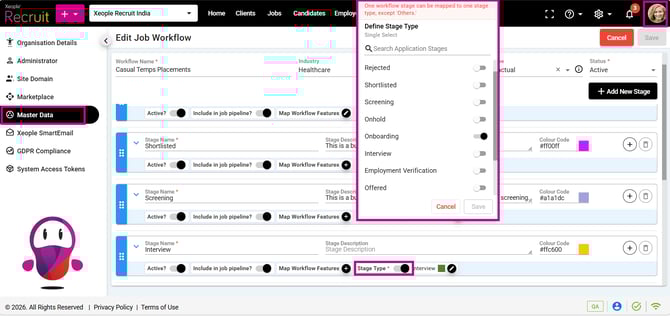
Administrator – Master Data - Job Workflow – Stage Type