
Xeople Recruit integrates with Microsoft 365 to sync email and calendar events directly within the platform. Because the integration accesses organisational mailboxes and calendar data, a Microsoft admin must grant consent once before any user can connect.
After connecting your Microsoft account, you will receive the pop up below:
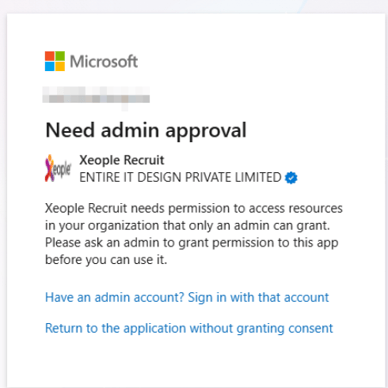
When prompted, sign in with a Global Administrator or Application Administrator account. This step is required once per tenant. A Microsoft consent screen will display the app name Xeople Recruit (Email Integration App) and the requested permissions. Review carefully, then click Accept to grant tenant-wide approval.
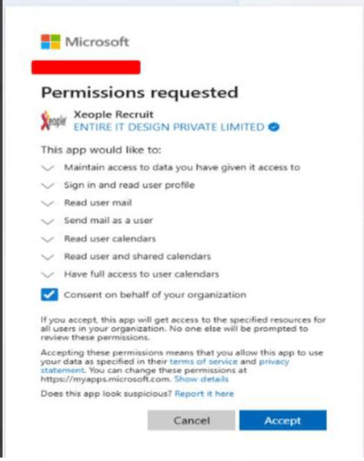
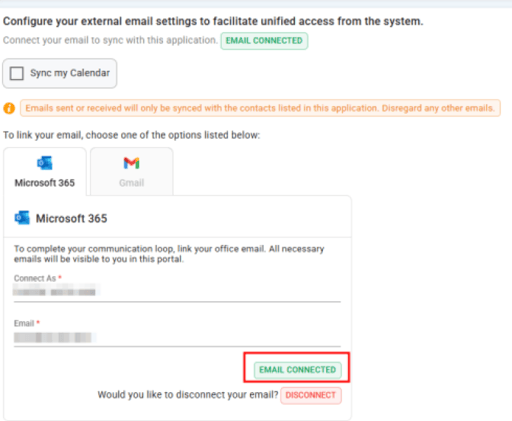
Once accepted, the status will show Email Connected. Individual users can now connect their own accounts without further admin involvement.
After connecting your Microsoft account, you will receive the pop up below:
When prompted, sign in with a Global Administrator or Application Administrator account. This step is required once per tenant. A Microsoft consent screen will display the app name Xeople Recruit (Email Integration App) and the requested permissions. Review carefully, then click Accept to grant tenant-wide approval.
Once accepted, the status will show Email Connected. Individual users can now connect their own accounts without further admin involvement.