
⚠️ Admin or Super Admin access required: Only Admin and Super Admin users can export the client list. There can only be one Super Admin per organisation. If you do not have the required access, please contact your Admin or Super Admin to request the export on your behalf.
Steps to export
- Log in to XeopleRecruit and navigate to Clients in the top navigation bar.
- Change the filter to list view

- Your complete client list will be displayed. Confirm that all clients are visible by checking the total count shown at the top (for example, Total Client(s): 79).
- If you would like additional filters before you export please filter as required
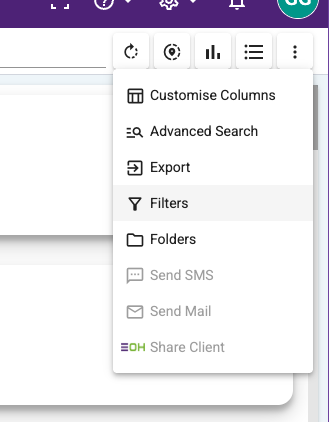
- If you would like additional filters before you export please filter as required
- In the top-right corner of the client list, click the three-dot menu (⋮) icon.
- A dropdown will appear with several options. Click Export (highlighted in the menu).
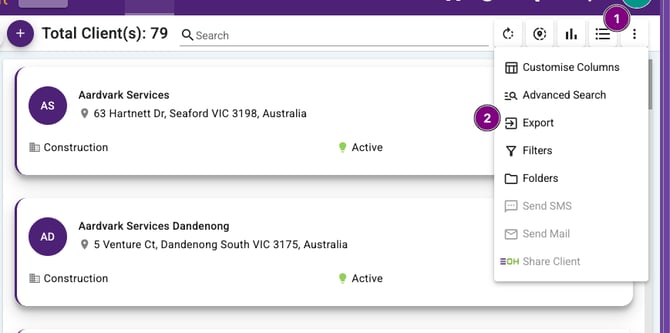
- Your client list will be exported successfully. You can then save or share the file as needed.
- The columns included in the export are
-
Organization Name
-
Company Name
-
Client Address
-
State Name
-
Country Name
-
Zip Code
-
Industry
-
Sub Industry
-
Brand Name
-
Email
-
Phone Number
-
Parent Client
-
Client Relationship Manger
-
Type
-
Reason
-
Status Name
-
- The columns included in the export are
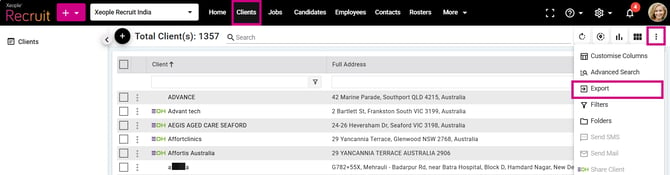
Client Landing - Three- dot - Export