
Step-by-Step Walkthrough
Step 1 — Find the Job Code
Locate the job code for the current job with the unscreened applicants.
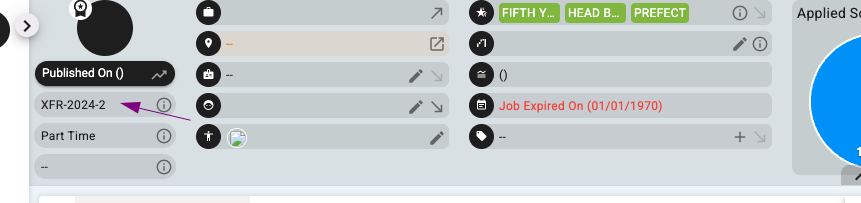
Step 2 — Go to Xeople Search (XR Search)
Filter by:
- Job — select the relevant job
- Stage — filter to the stage you want (e.g. unscreened applicants)
- Ensure to tick "Include Candidates in active job pipeline"

Step 3 — Expand Results & Select All
- Expand your results to capture all applicants (e.g. set to 500 or 1000)
- Confirm the count matches your expected number from the dasboard
- Select All
Step 4 — Bulk Email
With all candidates selected, use the Email function to send a bulk message.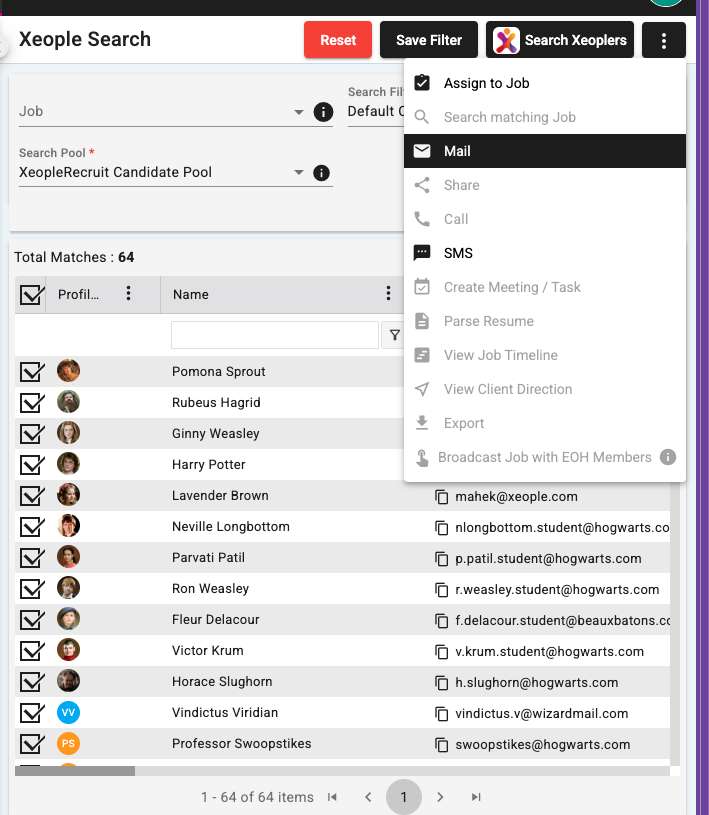
What do I put in the email?
If the job has a mix of qualification types (e.g. RN, EN, AIN), you can't reliably separate them by qualification in Xeople Search depending on your intital job— so include separate apply links for each role type in the one email:
Registered Nurses (RN) — apply here: [link]
Enrolled Nurses (EN) — apply here: [link]
Assistants in Nursing (AIN) — apply here: [link]
This way candidates self-select the right role and reapply using the knockout questions.
What do I do with the old job?
Once candidates have been emailed the new link, close out the old job. New applications will flow into the new job posting instead.
FAQs
Can I separate candidates by qualification in Xeople Search? Not reliably if the original job was a joint/mixed ad. The workaround is to include multiple apply links in the one bulk email and let candidates choose.
How do I know my filter is capturing everyone? Cross-check the result count in XR Search against the applicant count on the job
Do I need to create the new job first? Yes — have the new job(s) created and the apply links ready before sending the bulk email, so candidates can apply immediately.
What happens to candidates who don't reapply? They'll remain in the old job record. Once you close the old job, they won't progress further unless they reapply via the new link.